
How to Taxi Anywhere
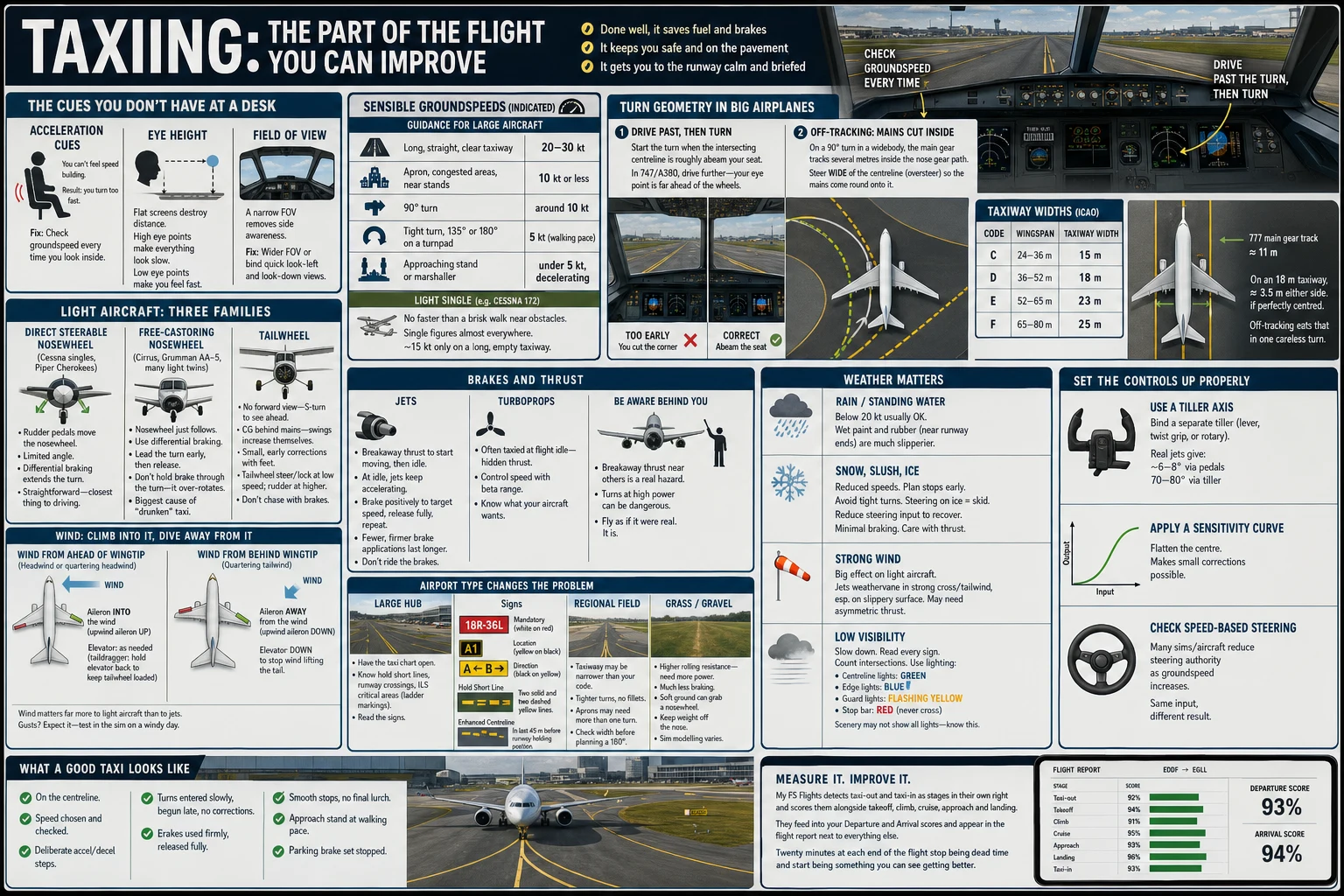
You know the shape of the problem, the 737 keeps putting a main wheel on the grass in 90° turns, even though the nose tracked the yellow line perfectly and the Cirrus won't steer at all, snaking down every straight taxiway in a slow, maddening oscillation that gets worse the harder you concentrate. The standard advice, taxi at a brisk walking pace, ten knots in the turns, follow the centreline, hasn't fixed any of it, because none of those problems is a speed problem or a line-following problem.
Taxiing on a desktop simulator is harder than it looks and harder than it is in a real cockpit, for reasons that have nothing to do with skill. The good news is that almost all of it reduces to a small amount of geometry, one perceptual trap, and a control setup that most simmers have never questioned. Get those three right and the same technique works in a Cub, an A320, a floatplane and a 747 on an icy ramp.
The one number that governs everything
Every aircraft you will ever taxi has a single figure that determines how it must be steered on the ground. The distance from your eye to the main gear. In a Cessna 172 the mains are a metre or two behind you. In a 737-800 the wheelbase is about 15.6 m and your eye sits roughly 18 m ahead of the main wheels. In a 747 that eye-to-gear distance is on the order of 30 m. You're steering a vehicle whose wheels are ten car-lengths behind your seat.
This number explains the classic corner-cutting failure completely. When your eye crosses the centreline of the intersecting taxiway, the main gear is still that full distance short of it. Begin the turn "when the line is under you" and the mains pivot early, cut inside the corner, and end up on the grass, while from the flight deck everything looked immaculate, because the nose tracked the line beautifully. Corner cutting is invisible from inside the aircraft. It's only visible from outside, which is why it survives hundreds of flights uncorrected.
The mechanism is worth understanding because it lets you derive the fix for any aircraft. In a turn, every point on the aircraft describes an arc around the same instantaneous centre. The nosewheel is furthest from that centre, so it sweeps the widest arc, while the main gear, closer in, tracks a tighter one. The gap between the nosewheel's path and the main gear's path grows as the turn tightens. A gentle 30° bend forgives sloppy technique because the offset is small. A 135° turn onto a parallel taxiway punishes it, because the offset is at its maximum exactly when the pavement margin is at its minimum.
The consequence in anything bigger than a light single, you do not steer the nose along the line. You deliberately carry the nose past the turn point, "oversteer" in the airline phrase, so that the mains, cutting inside, land on the centreline instead of inside it. In a widebody the flight deck ends up over the grass on the far side of the turn, which feels alarming precisely once.
The practical fix is a cue on the airframe, not a point on the ground. The intersecting centreline should appear somewhere specific, abeam your shoulder, under a particular window frame, at a certain angle behind you, before you start the turn, and that cue depends on your aircraft's geometry and your camera position.
Why the simulator makes this worse
Two things a monitor takes away matter enormously on the ground.
The first is peripheral vision. Your sense of speed while moving along a surface comes overwhelmingly from optic flow in your peripheral field, and a single monitor at normal viewing distance covers perhaps 30 to 40° of a visual field that spans roughly 200° in reality. Almost all of the flow that tells your brain "you are moving fast" is missing. The result is systematic and universal. Sim pilots taxi too fast and are certain they do not. Twenty knots on a monitor produces the visual sensation of about ten. The advice to "taxi at a walking pace" cannot fix this, because your sense of walking pace is exactly the thing that's broken. VR and head tracking restore some of the flow, which is why VR pilots often find their taxi speeds drop.
The correction is instrumentation, not willpower. Put the groundspeed readout in your scan and obey it for the next fifty flights, the way a student pilot leans on the airspeed indicator before learning to read attitude. Your sight picture will recalibrate, but only against a reference.
The second missing thing is a consistent eye point. Default camera positions frequently do not match the aircraft's design eye position, and if yours is too low or too far forward, every turn-initiation cue you calibrate is wrong the day you reset the camera. Fix the eye point first, save it, and never learn geometry against a moving reference. Related, the cockpit cut-off angle means the ground close ahead is invisible from the flight deck, so the hold-short line disappears under the nose well before you reach it. Pick your stopping mark early and stop on memory, not on sight. On a flat screen with unreliable depth perception at 5 to 30 m, known-size references like the double hold-short line beat eyeball estimation every time.
Speed, thrust and brakes
The canonical numbers, no more than about 20 kt on the straights, 10 kt or less in turns, and some operators use 8 kt for turns beyond 90°, are operator recommendations, not certification limits, but the physics behind them is worth having because it scales to any aircraft.
Turn speed is limited by lateral load on the tyres and the people in the back, and lateral acceleration goes with the square of speed. On an illustrative 25 m turn radius, 10 kt produces about 0.11 g of side load, while 20 kt produces about 0.43 g. Doubling the speed quadruples the load. That square law is the entire content of the "10 knots in turns" rule, and it tells you why a slightly-too-fast turn feels fine and a moderately-too-fast one throws the cabin crew across the galley.
There's a second, subtler rule hiding in tyre physics. A tyre has one total friction budget, shared between cornering and braking. Braking during a turn steals from the cornering budget, which is why the real technique is slow before the turn, then turn at steady speed, not enter fast and trim the speed with the brakes mid-arc.
Thrust discipline follows from rolling resistance, which on dry concrete is roughly 2% of aircraft weight. Taxiway longitudinal grades are limited by design standard to around 1.5% for larger aerodromes, which is why idle thrust usually holds a steady taxi speed, and why, on the occasional downslope, an aircraft accelerates at idle with no thrust at all and the pilot who is not watching the groundspeed finds out late. Getting rolling takes more. Breakaway thrust, typically a brief 30 to 40% N1 in an airliner depending on weight and surface, then back towards idle once moving. On grass the rolling resistance coefficient is several times higher, which is where the old rule about never stopping a heavy aeroplane on soft ground comes from.
Brake technique is where hardware intrudes. Brakes bound to a joystick button are binary. Full braking or none. The result is the sawtooth, thrust up, drift to 25 kt, slam to 8 kt, repeat, which feels efficient and is the signature of a pilot who is not reading the route ahead. The opposite error, riding the brakes against above-idle thrust, is undetectable by feel in a simulator because there's no deceleration cue and no brake-temperature consequence. It shows up only in data, as a brake duty cycle that never reaches zero. An analogue brake axis, ideally toe brakes, changes this phase of flight more than any technique advice can. If a rudder pedal set is a purchase decision you're weighing, ground handling is the strongest argument for it, and pedal hardware and axis-curve setup is a subject big enough for its own article.
One more habit the sim never punishes. Pivoting the aircraft while stopped, turning the nosewheel with a main wheel stationary. It scrubs the tyre badly enough that several manufacturers prohibit it. Keep a little forward roll on through every turn, including the last few degrees into a stand.
What your pedals actually command
Here's the setup problem that ruins more sim taxiing than any technique fault. In a real 737 or A320, the rudder pedals command only a small nosewheel deflection, on the order of 6 to 7°, enough to hold the centreline on the straights and make gentle corrections. All the large steering angles, roughly 75 to 78° at the nosewheel, live on the tiller, a separate hand control. Many default and lower-fidelity add-ons ignore this and map full nosewheel authority onto the rudder axis. The aircraft becomes twitchy at any speed, every small pedal input swings the nose, and the pilot learns large-amplitude leg inputs that no real aircraft would accept and that behave differently in the next add-on they buy.
Real nosewheel steering is also speed-scheduled in most jets. Full authority at walking pace, progressively reduced as groundspeed rises. That's why the same pedal input does nothing at 35 kt and swings you off the line at 8 kt. An add-on that models this is teaching you the right reflex, and one that does not is teaching you the wrong one, and it's worth knowing which you have.
Below roughly 30 kt a jet's rudder itself is aerodynamically dead. The pedals are a steering wheel and nothing more. A propeller aircraft is different. Propwash keeps the rudder alive from the moment the engine starts, which is why a taildragger can be steered on the rudder at 3 kt and a jet cannot.
Three setup consequences. First, if your add-on models a tiller as a separate axis, bind one. A spare slider or a second stick's axis is enough, and for a jet simmer it's the highest-value control change available for the ground phase. Second, reduce rudder-axis sensitivity by 30 to 40% and add a small deadzone, because all the useful taxi steering lives in small deflections, and a spring-centred axis has no proportional resolution there by default. Third, check your frame rate at big airports. Taxiing is a tight, closed-loop tracking task, and at 20 fps the display adds visible lag to your own reaction time. The resulting centreline oscillation is pilot-induced oscillation caused by the loop, not by your hands. Snaking on the straights is almost never a technique problem. Telling a snaking pilot to "be smoother" produces a tenser pilot oscillating at higher frequency.
Different aircraft, different rules
Free-castoring nosewheel (Cirrus SR-series, Grummans, many Diamonds). The nosewheel is not connected to anything. Differential braking is not a supplement to steering. It is the steering. You steer with your feet on the toe brakes, use bursts rather than drags, and accept that the aircraft will not track straight hands-off. Half of the "my Cirrus is broken" posts in sim forums are this, undiagnosed.
Steerable-nosewheel singles (C172, PA-28). Pedals give roughly ±10° of nosewheel, extending to around 30° with a boot of differential brake for tight turns. Forgiving geometry, because the mains are just behind you, which is why these are the aircraft to learn the basics in.
Tailwheel. The centre of mass sits behind the main gear, so the ground track is directionally unstable and every swerve feeds itself. S-turns exist for forward visibility over the nose, not tradition. A lockable tailwheel changes the whole technique, and most sims model taildragger weathervaning enthusiastically, sometimes more than reality does.
Turboprops. Beta range gives you a speed control that costs no brake energy. Holding 12 kt on the power levers rather than on the brakes is a distinct skill and is available in the sim if the axis is mapped properly.
Narrowbody jets. Everything above about eye-to-gear distance, tillers and oversteer applies in full.
Widebodies. The limiting dimension shifts from the gear to the wingtips, an A380 spans just under 80 m, and taxiway code letters start excluding you from parts of the airport, so the route on the chart is a constraint, not a suggestion. The 747 adds body-gear steering, the rear bogies steering up to roughly 13° opposite the nose, because with a 25 m wheelbase an unsteered rear bogie would scrub sideways through the whole turn. It's why widebody turns feel assisted and turn tighter than the geometry suggests. The A380 and 747-8 also model ground-manoeuvring camera systems, which partially solve the desk's biggest widebody problem. You have no peripheral vision out the side windows to judge where the wing and gear are.
Business jets. Many have no tiller and higher-authority pedal steering, closer to a big piston single than to an airliner, which surprises people stepping up from GA and down from the 737 alike.
Floatplanes. No brakes at all. Idle taxi, plough taxi and step taxi are three separate regimes, water rudders retract for takeoff, and you cannot stop, only slow, which changes every approach to a dock. Sailing backwards on the wind is a real technique and its own article.
Helicopters. Hover taxi, air taxi and ground taxi (for wheeled types) are three different operations with different height, speed and clearance rules, and the aircraft's behaviour changes partway through as translational lift arrives. If you fly rotary, treat it as its own study.
Different airports, different weather
A grass strip with no markings inverts the problem. There's no line to follow, so you judge usable width against your known wingspan, backtrack the runway if there's no taxiway, and keep moving on soft ground because breakaway resistance climbs steeply once stopped.
A mega-hub inverts it the other way. The steering is trivial and the navigation is everything. Long routes, Schiphol's Polderbaan taxi runs several kilometres and the better part of twenty minutes, demand that you write the clearance down, know the hot spots marked on the chart, and read the signs rather than the moving map while rolling. Reading taxi diagrams properly, and the phraseology of clearances on VATSIM and IVAO, are both their own subjects. The one rule that belongs here is that when lost you stop, then plan. Steering while confused is how incursions happen, and runway incursion prevention deserves an article of its own too. Bear in mind that procedurally generated default scenery can have missing or misplaced hold-short lines and signage, so practise signage discipline at hand-built airports where the markings can be trusted.
At night the light colour code becomes the navigation system. Blue edges, green centreline, and alternating green and yellow centreline lights where you're inside an ILS critical area, the one most simmers have never consciously noticed. Low visibility is the best free drill in the hobby. Set 75 m RVR and follow the centreline lights and the chart from stand to holding point. It costs nothing, risks nothing, and cannot be practised in a real aircraft on a real airfield at any price.
Contaminated surfaces deserve honesty. On ice, the technique changes are real. Straight-line braking only, wider and slower turns, no differential braking, and much more anticipation, because weathervaning is a moment balance between fin side force and nosewheel cornering force, and on ice the nosewheel cannot hold up its side of the balance, so a jet weathervanes at taxi speed in a way it never does on dry pavement. But ground friction modelling is the weakest fidelity area in every supported simulator, it differs between MSFS, X-Plane and P3D and between add-ons, and wet or icy surfaces are sometimes cosmetic. Practise the decisions, the speeds, the margins, the routing. Don't believe the sim has taught you how a real aircraft feels on ice, because the underlying model is not good enough to make that claim.
What the sim can and cannot teach you here
The transfer picture is unusually clear for this phase. Chart reading, route memorisation, sign and marking recognition and hot-spot awareness are knowledge tasks and transfer essentially intact. So does the concept of turn geometry. A type rating will still teach you the cues, but you'll know why they exist.
The negatives are worth mentioning. A rudder axis with full nosewheel authority trains inputs a real jet will not accept, on the wrong limb. The absence of vestibular and seat cues means you never learn to feel acceleration, tyre scrub or brake grab, which is a large part of how real pilots monitor the ground phase. Sim taxi is visual-only and real taxi is not. Heads-down moving-map use while rolling is free and effective at a desk and a documented incursion contributor in an aircraft. And a hold-short violation costs a simmer nothing, so the single most safety-critical taxi behaviour receives zero reinforcement unless you impose it on yourself, a habit worth building deliberately, by checking after each flight whether you actually stopped short of every line you were not cleared through.
Drills that actually fix it
The single most valuable one is the turn calibration drill, and it exploits the one place the sim beats reality outright. Pick one aircraft and one 90° intersection. Taxi it twenty times, varying only where you begin the turn. After each pass, use an external or top-down replay to see where the main gear actually went, a view no real pilot has ever had of their own tyre tracks. Find the airframe cue that puts the mains on the line and write it down. Then vary it. Different intersections, different airports, eventually different aircraft, because varied practice transfers better than grinding one corner even though it feels less productive in the session.
Around that spine.
- The speed calibration drill. Hide the groundspeed readout, taxi a straight at what feels like 10 kt, then reveal it. Repeat until your error is under about 3 kt. Almost everyone starts fast, often by nearly double.
- The counting check. Standard spacings turn any airport into a speed trap. Taxiway edge lights sit roughly every 60 m on straights, so at 10 kt (about 5 m/s) one passes every twelve seconds. No instrument needed.
- The no-brake taxi. Stand to holding point in a jet without touching the brakes. Forces genuine anticipation, and where you fail tells you where you stopped reading ahead.
- The idle-only taxi. One application of breakaway thrust, then idle the whole way. Shows you how much of your speed the throttle was quietly managing.
- The castoring drill. Ten minutes in a Cirrus, differential braking only, in and out of a tight parking row.
- The 180° test. A 737-800 needs roughly 25 m of pavement width to turn around. Runways are commonly 45 m wide, but not always. Try progressively larger types on progressively narrower runways until you find the one that does not fit, and learn to recognise that moment before committing, because there's no recovery from a turn the aircraft cannot complete.
Five focused repetitions of one turn teach more than a whole flight's worth of incidental taxiing, because a normal flight offers perhaps three ground turns and no feedback on any of them.
Reading your own taxi data
Most taxi errors are invisible from the seat, which is why they persist. The corner cut looks perfect from inside, brake-riding produces no sensation, and speed creep is by definition unnoticed. The fixes above all depend on feedback, and the simulator can supply feedback a real cockpit cannot. Exact groundspeed, exact lateral offset, wheel-by-wheel position, continuously. Taxi is one of the few phases where desktop measurement is better than the real thing, and it's the same event set, taxi speed exceedances, high-speed turns, that airline FOQA programmes monitor.
This is something I built My FS Flights to catch. Taxi to and from parking is detected and scored automatically as part of the flight report, inside the Departure and Arrival scores. One score is noise. The value is longitudinal. Fifty flights show whether your taxi speed is creeping upward as an airport becomes familiar, the same drift real flight-data monitoring exists to catch. Be honest about what it measures, though. Mechanics, not airmanship. No score can see whether you had a clearance or crossed a lit stop bar, and a taxi score can be gamed by crawling everywhere at 5 kt, which blocks taxiways and is not good taxiing. The target is appropriate speed for each segment, held smoothly, not minimum speed held everywhere.
The diagnostic patterns are worth learning to read, because two traces that look similar have opposite fixes.
| Pattern in the data | What it means | The fix |
|---|---|---|
| Sawtooth speed trace | Not reading the route ahead | Anticipation and thrust discipline, not braking technique |
| Sustained speed with continuous light braking | Riding the brakes against thrust | Reduce thrust; brake positively, then release fully |
| Lateral offset spike after every turn | Geometry error: turning at the wrong point | Later turn initiation, not gentler steering |
| Lateral offset oscillating on the straights | Axis sensitivity or frame rate | Setup, not practice |
That last row is the one that saves the most wasted effort. A pilot who snakes down straights and practises harder is drilling against a hardware problem.
Taxi is the phase the hobby skips. Slewed past, teleported through, hurried. It's also the only phase in which you can hit something, and the one where the simulator's advantages over reality are largest. Free repetitions, weather on demand, and a top-down replay of your own gear track. Twenty passes through one intersection this evening will do more for your ground handling than the last hundred flights did.